API Docs
Documentation for using the SCREEN GraphQL API.Authentication
Authentication
The SCREEN API requires an API key for programmatic access. Send the key in the
Authorization header on each request to the GraphQL endpoint.
Generate an API key
- Sign in to the API Console.
- Open the API Keys dashboard.
- Click
Create API Key. - Copy the generated key and store it securely.
API keys are active for 90 days. If your key expires, create a new one from the dashboard.
Use your API key
Include the key as a bearer token:
Authorization: Bearer <token>
For example, with curl:
curl 'https://screen.api.wenglab.org/graphql' \
  -H 'Content-Type: application/json' \
  -H 'Accept: application/json' \
  -H 'Authorization: Bearer <token>' \
  --data-binary '{"query":"{ cCREQuery(accession: [\"EH38E1516972\"], assembly: \"grch38\") { coordinates { start end chromosome } rDHS assembly } }"}'
Replace <token> with the API key from your dashboard.
Using your API key in Apollo Explorer
To explore this GraphQL service, you can use the Apollo Explorer, which provides a nice UI to make queries and view documentation.
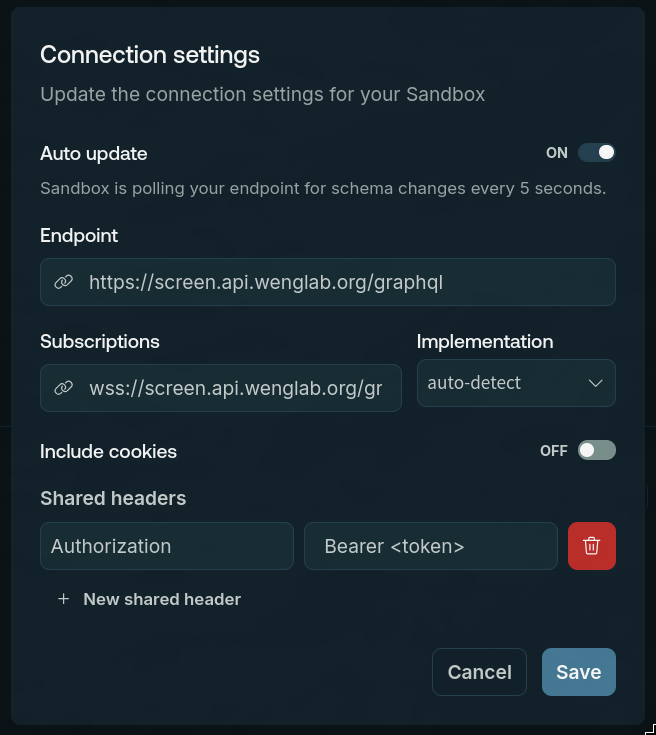
Add your API key to the request headers by opening the connection settings.

Then add the API key with the Authorization header and Bearer <token> as the value: